



Creating a precise fence CAD drawing is one of the most important steps in bringing a fencing project from concept to construction. Whether you’re designing a custom security fence, a decorative perimeter, or an industrial enclosure, accurate CAD plans not only save time but also help streamline communication between architects, contractors, and approving authorities.
At MFR Corp, we know that design efficiency directly impacts project timelines. The faster your drawings are complete and approved, the sooner fabrication and installation can begin. That’s why understanding what goes into a well-prepared CAD file is essential for faster, smoother fence design workflows.
The Role of CAD Drawings in Fence Design
CAD (Computer-Aided Design) drawings are the visual and dimensional blueprints of your fencing system. They define exactly how each component, from panels and posts to gates and hardware, fits together in the finished product.
A properly structured CAD file helps ensure that every stakeholder, from the project engineer to the fabrication team, is working from the same set of specifications. It also allows for precise measurement adjustments, easy revisions, and clear visualization of how the fence integrates with existing site conditions.
What Should Be Included in a Fence CAD Drawing?
Comprehensive details are key to a drawing that supports both design clarity and fast approval. While every project is unique, there are standard elements that should be included in most fence plans:
- Overall Layout: A clear plan view showing fence alignment, property boundaries, gate locations, and transitions between sections.
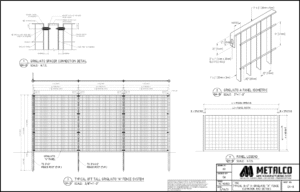
- Elevation Views: Scaled elevations that show fence height, panel configuration, and decorative or functional elements such as mesh patterns, rails, or toppers.
- Post and Footing Details: Accurate dimensions for post spacing, embedment depth, and concrete footing size to meet engineering standards.
- Material Specifications: Notes identifying materials, coatings, and finishes for each component to ensure compliance with project requirements.
- Connection Details: Diagrams showing how panels, posts, and gates connect like bolts, welds, or proprietary fasteners.
- Hardware and Accessories: Gate hinges, locks, and optional security or aesthetic accessories should be clearly labeled and referenced.
- Site-Specific Adjustments: Grading variations, slopes, and terrain changes are represented accurately to avoid surprises during installation.
Including these elements minimizes questions later and helps align engineers, contractors, and inspectors on a unified plan.
Are There Standard Formats for CAD Fence Designs?
The short answer is yes. And following them can make the difference between quick approval and costly delays.
Most professionals use DWG or DXF file formats because they’re widely compatible with design, engineering, and manufacturing software. Maintaining layer organization is also crucial. Keep structural elements, annotations, and reference lines separated by layer for easier editing and clearer visibility.
When working with a manufacturer or supplier, confirm their CAD file standards before submission. Many companies have established templates that specify text styles, dimensioning conventions, and line weights. Using their preferred format reduces the time spent converting or correcting drawings later.
You should also include both metric and imperial units if the project involves international coordination, as this helps prevent measurement misinterpretations during fabrication.
How Do Fence CAD Drawings Help with Permitting?
For most projects, CAD drawings form the backbone of the permitting and approval process. Building departments, homeowners’ associations, and project owners rely on these files to verify compliance with zoning laws, safety regulations, and aesthetic guidelines.
By submitting a professional, detailed drawing set, you can:
- Demonstrate that the fence meets height, setback, and material regulations.
- Show that gates and access points comply with accessibility and security codes.
- Provide engineering data, such as wind load calculations or foundation details, for structural approval.
In short, complete and properly formatted CAD drawings give permitting authorities confidence in your design. Ultimately, that can dramatically speed up the approval timeline.
Tips for Creating Efficient CAD Files
When time and precision matter, even small workflow improvements can make a big difference. Consider the following best practices for producing fence drawings that are easy to read, share, and approve:
- Start from a Template: Use a standardized drawing template with preset layers, dimension styles, and title blocks. Consistency across files not only saves setup time but also ensures your drawings meet professional standards every time.
- Label Everything Clearly: Ambiguity causes delays. Label components, dimensions, and material callouts precisely. Avoid abbreviations unless they’re universally recognized by your project partners.
- Use Layers Strategically: Separate structural, electrical, landscape, and annotation elements. Organized layering helps reviewers focus on relevant information quickly and simplifies edits later.
- Include Reference Dimensions: Add extra reference dimensions beyond minimum requirements, such as total fence length, gate swing radius, and distance between critical points.
- Check Compatibility Before Sharing: Different teams use different CAD programs. Before sending your files, ensure compatibility by testing exports to DWG, DXF, or PDF. Providing both editable and read-only versions can eliminate communication delays.
- Maintain Revision Control: Always include revision dates and descriptions in your title block. This avoids confusion when multiple versions circulate between design, engineering, and permitting teams.
- Simplify When Possible: Keep your file lightweight by removing unnecessary geometry, overlapping lines, or excessive hatching. Clean, efficient drawings load faster and print more reliably.
Common Mistakes That Slow Down Approval
Even experienced designers can fall into habits that cost valuable time during the approval process. Watch for these issues:
- Incomplete dimensions
- Unlabeled gates or hardware
- Incorrect scale or units
- Too much detail
Before final submission, perform a peer review or internal audit to catch these errors early.
Fence projects involve multiple stakeholders, including architects, engineers, manufacturers, and end clients. Collaboration throughout the CAD drawing phase ensures every requirement is addressed before fabrication begins. A well-structured collaboration process not only improves design accuracy but also shortens the path from initial concept to approval and installation.
Faster Approvals Start with Clear Design
When time is money, clarity and precision are your biggest allies. A well-prepared fence CAD drawing captures every essential detail, reduces revisions, and makes it easier for reviewers to sign off quickly. At MFR Corp, we work with architects, engineers, and builders nationwide to deliver fence systems that meet both performance and aesthetic goals. Our in-house drafting team understands the importance of well-structured CAD files, ensuring projects move smoothly from design through approval to fabrication.
Contact us today to learn how we can help you streamline your design process, accelerate approvals, and build your next fencing project with precision and speed.